
By Krish Lukha
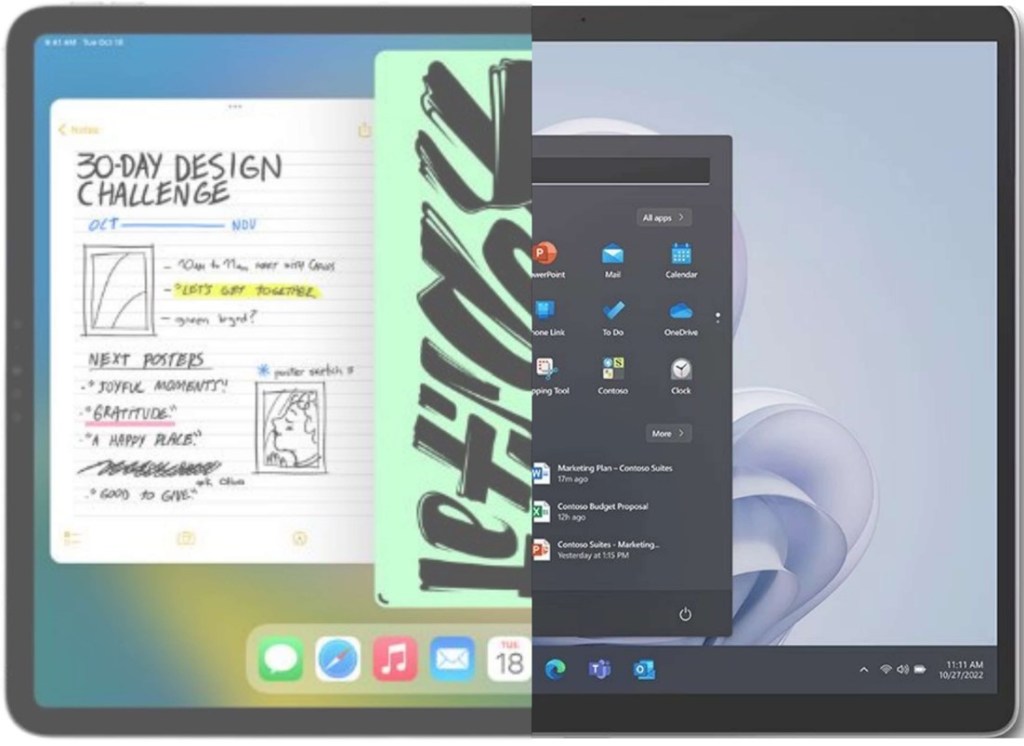
Surfaces are the devices we depend on most throughout our time at the RGS. However, this has brought on a plethora of technical issues, most notably glitches, crashes, and fast battery drains. New students are now being automatically signed up to the Digital Levy program, being forced to use school surfaces without an alternative, and whilst many are impartial or in favour of this change, there are many who are unhappy about it. On the other hand, students at GHS are designated an iPad and those at Guildford County have the liberty to choose any device which has the necessary capabilities for school life.
Firstly, it is worth noting that surfaces bring numerous advantages. The school can efficiently safeguard students and can monitor any malicious activity using software such as SensoCloud or SecurusXT. Whenever a student requires an app which is not available on the curated app store, they must first visit the IT department to make the necessary installation, thereby preventing the download of inappropriate software. Whilst this may hinder productivity, it is vital for safeguarding purposes. Furthermore, all Microsoft apps such as OneNote or Teams are seamlessly compatible with the Surface hardware and the peripherals are less expensive than their Apple counterparts. These devices can connect to boards in every classroom and the Wi-Fi connection occasionally can be brilliant. The fact that the pen charges within the keyboard on the latest Surface Pros is an efficient way to prevent a student from losing a stylus or having to replace its battery.
However, surfaces remain unsuitable for daily tasks in a multitude of ways despite their benefits, most notably due to performance issues. Every day, numerous students are plagued with problems which impede productivity within lessons. Even teaching staff have issues and at times, the lessons cannot be properly conducted until these have been resolved. The more premium Surface offered, the Surface Pro 9, is less powerful than the iPad 2, whilst both products can be purchased at similar prices. A Surface makes use of a USB-C port for data transfer and a separate port for charging, meaning that a specific charger must be brought in to mitigate the poor battery life. On the other hand, an iPad pro utilises the same USB-C port for charging and transfer, making use of Thunderbolt-4 technology which is faster. In terms of display, the surface and iPad are similar. The former has a larger display with a better aspect ratio and a 120Hz refresh rate whilst the latter has a crisper display and uses mini-LED technology. Whilst the iPad does not yet have an OLED display, this is set to change by this time next year.
iPads and Surfaces are not the sole devices in the fast growing 2-in-1 market which are available for use. Windows 2-in-1 devices such as the Asus ZenBook, Flow X13 or HP Envy x360 are also suitable for school use, with touch screens, faster processors (depending on the model) and rotating hinges which permit a “studio mode.” A GHS student said that she like using their Samsung Galaxy Book 360 and have had no issues whatsoever with it. The internal processor is also faster and provides a smoother user experience. Battery life is also not a problem, unlike with Surfaces, which overheat easily.
The main issue of upgrading is cost and is a reason not to abolish the program. A lower sixth form student said: “It could be a bit much of an effort to upgrade to iPads, some may even say it is a downgrade and the school may waste a bit of money, which the school could use otherwise e.g. to donate to charity. I do think that iPads are better overall, and, in the future, they can start to implement iPads which are seen as the better option.” To rectify the issue of cost, the school could allow freedom of devices starting from next year and this would be implemented from First Form.
Overall, the school is divided between using Surfaces and replacing them in favour of other devices. Mr Rossiter expressed that he understands the frustration; some families may not be able to afford a separate device to complement a work device which students are forced to pay termly for (although he does say that students should keep work and school devices separate if they are loaned). However, he strongly stands by the school’s decision, appreciating the seamlessness of Microsoft apps and the use of safeguarding software, but does admit that he prefers the iPad hardware in terms of usability (having experienced the use of them at his previous school). He believes that schools should “go all in” on either Apple or Microsoft and that they should not combine the two. Lewis Wilson also expressed his concerns with his surface in a recent interview, claiming that “the battery life is bad… [and whilst productivity works fine for me] …sometimes the CPU gets a bit overloaded when numerous apps are opened.”
As I have previously mentioned, one of the advantages of the Digital Levy scheme is safeguarding. However, an anonymous 6th former has proved that the school can easily rectify this issue, claiming that: If they want to restrict our access to online applications, they can already do that as they can moderate the packets received by our devices on their Wi-Fi which we have to use in school anyway; surely we should be allowed to pick a device that enables us to learn at our best! If we do indeed choose a surface and we want to go through the Digital Levy program, we should be able to. However, they should allow us to opt out if we so wish to.” Mr Rossiter also claimed that Cranleigh had a variety of software to monitor students. This has been confirmed by other schools in Guildford which also block the use of downloads on the App Store.
So, to conclude, I believe that Surfaces should be a choice, not an enforcement. We cannot revert to paper due to both the environmental concerns and limitations. Other devices are much more suitable for the same price with faster processors, more premium build quality and a variety of different ports in comparison to solely a USB-C and charging port on the Pro 9. As I have already established, safeguarding protocols are of no issue and software is equally as good, if not better, on other platforms. Students should have the liberty of selecting their own devices and should be free to opt out of the Digital Levy program (at the very least!). If you feel strongly about this issue (or are just bored), please take 2 minutes to complete the brief survey at the top on behalf of the 1509.



 The 1509